
Word-by-word captions, made automatically with Claude Code
Each word lights up as it's said, built from the voice's word timings. The free Claude Code route, timed, plus the CapCut, Premiere and DaVinci steps.

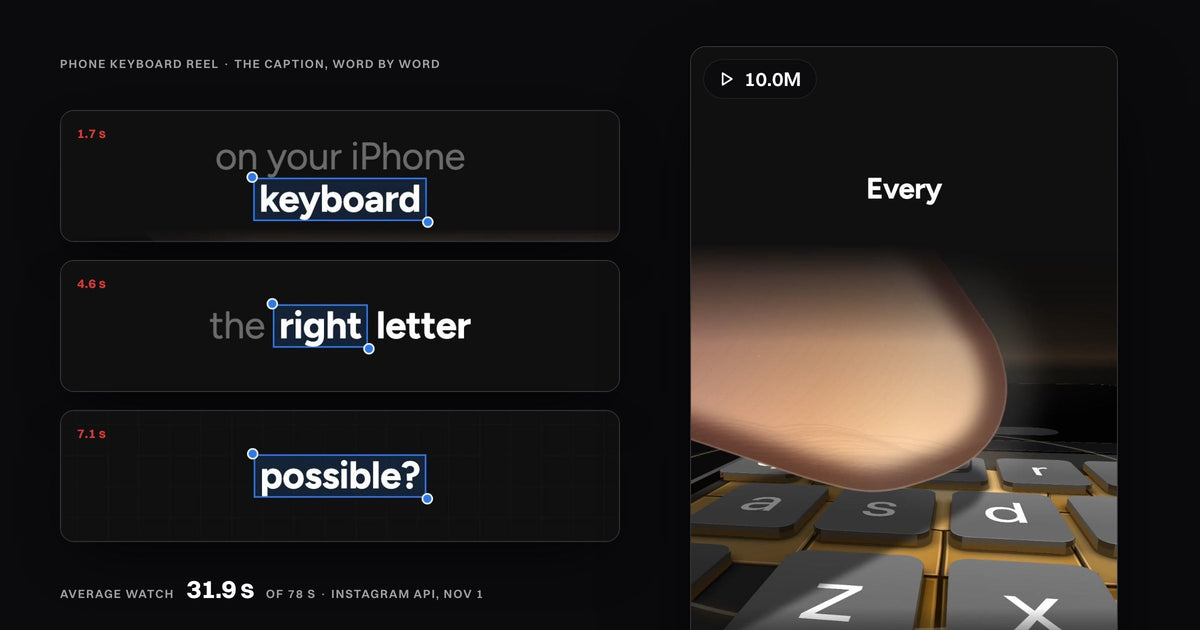
Word-by-word captions light up each word the moment it's spoken, so they need a timestamp on every word. Claude Code makes them automatically when it builds the reel from the voice's word timings. That's how my explainer reels get theirs, including a phone keyboard reel at 10.0M views (Instagram API, Nov 1, 2026). In CapCut, Premiere Pro or DaVinci Resolve, you generate captions from the audio, then set a word-by-word style by hand.
- Word timings do the work. A transcript with a start and end time for every word. Whisper, CapCut, Premiere and DaVinci all make one.
- The free Claude Code route works. Remotion's captions skill took a 10-second clip from an empty folder to a captioned 1080x1920 MP4 in 4 min 14 s, all 37 words right.
- It doesn't pick the key word or change the picture with it. My posted reels do both, and held 30 to 52 seconds of average watch time.
- By hand: CapCut's auto captions plus a template, Premiere's Single Word layout, or DaVinci Resolve Studio's Word Highlight.
What word-by-word captions look like in a 10M-view reel
Word-by-word captions are on-screen text where the unit is one word: it appears, or lights up, exactly when the voice says it. A normal subtitle shows a whole sentence and leaves you to read ahead.
In my reels the line builds as the voice speaks. The word being said is white and bold, the words before it turn grey, and one key word gets a blue box. The picture under it moves on that same word: the view drops onto the keys on "keyboard".
 0.5 s
 1.7 s
 4.6 s
 7.1 s
I make these with Full Visual, a folder for Claude Code and Codex. The whole format, layer by layer: how people make those Claude reels.
How to add word-by-word captions automatically with Claude Code
Ask Claude Code for word-by-word captions and it transcribes the audio with a timestamp per word, groups the words into short lines, and renders the video with the spoken word lit up. No timeline, no dragging captions by hand.
The free way to try it is Remotion's own captions skill. Remotion is free for individuals and companies of up to 3 people; Claude Code needs a paid Claude plan or an API account. The setup, from Remotion's docs (read Nov 1, 2026):
- Run
npx create-video --yes --blank my-video, thencd my-videoandnpx remotion skills add. - Put your clip in the
publicfolder and startclaudein the project. - Ask: "Add word-by-word captions to clip.mp4 and render it at 1080x1920."
The skill runs Whisper on your own computer (the small.en model, downloaded on the first run), saves every word with its start and end in milliseconds, and draws them with one of Remotion's caption styles. Installing Remotion in Claude Code in more depth: Remotion with Claude Code.
Go deeper: the test, step by step
create-video, blank template38 s
Empty folder to MP4: 4 min 14 s on a Mac, Nov 1. Built by Claude acting as Claude Code with only Remotion's skills and the one-line brief. The skill's default style shows a 3-second block with no highlight, so for "word-by-word" it switched to Word Highlight from Remotion's caption library.
 1 s
 2.6 s
 4.6 s
 7.1 s
Remotion's free captions next to a reel at 10M views
The free route gets the timing right and leaves every choice to you. I gave it the first 10 seconds of the phone keyboard reel's voice on a plain background, so both versions say the same words at the same moments.
Remotion captions skill, 4.6 sEvery word turns blue in turn, "right" included.Posted reel, 4.6 s"Right" is boxed while a key pops up under the finger.
What worked: all 37 words transcribed right, each lit while it was spoken, the right size first time, and a project you can edit and render again.
What it left to me: every word gets the same highlight, so nothing tells the viewer which one matters. Lines break by time, not meaning ("letter almost every", "that possible? Because" across two sentences), the text shrinks on longer lines, and the picture under the words never reacts.
Captions built with the reel held 30 to 52 seconds
In my reels the caption isn't added after the edit. Claude Code builds it with the scenes, from the voice's word timings, and renders the MP4, so the boxed word and the picture land on the same moment and can't drift apart.
One account, so read it as a pattern, not proof: the subject and the opening line count as much as the caption. What a good number looks like: average watch time on Instagram reels.

Full Visual
Explain any subject, word by word. A voice, a synced caption and real interfaces moving on every word.
Claude Code, CapCut, Premiere or DaVinci: which to use
All four time the words for you. They differ on who decides which word stands out, and what the catch is.
| Route | Word timing from | Which word stands out | The catch |
|---|---|---|---|
| Claude Code + Full Visual | The reel's own voice | One key word boxed, picked when the reel is written | English only; the voice runs on your own ElevenLabs, OpenAI or Fish key |
| Claude Code + Remotion's captions skill | Whisper, on your computer | Every word in turn | No key word, no picture; Claude Code needs a paid plan |
| CapCut | Auto captions | Whatever the template does | You choose and check the template |
| Premiere Pro | Transcribe sequence | One word on screen at a time | No in-line highlight on Adobe's page |
| DaVinci Resolve | Create Subtitles from Audio | Each word in a highlight color | Studio version only |
Word by word captions in CapCut
CapCut writes the transcript; the word-by-word look comes from the caption style you put on it. On desktop, from CapCut's help pages (read Nov 1):
- Click Captions, then Auto captions, pick the spoken language and click Generate.
- Double-click a caption block to fix misheard words.
- Pick a caption template that animates per word, and preview it with sound.
- Split any long caption at a pause with Cmd+B (Ctrl+B on Windows), then export.
CapCut says it plainly: "transcription, timing, and word highlighting are separate functions" (Oct 19, 2026).
Word by word captions in Premiere Pro
Premiere has it built in as the Single Word layout. From Adobe's help page (updated Aug 18, 2026):
- Choose Window > Workspaces > Captions and Graphics.
- In the Text panel, click Transcribe sequence if it isn't transcribed yet.
- In the Captions tab, click Create captions from transcript.
- Open Captioning Preferences, set Layout to Single Word, then Create captions.
You get "a caption track where each caption contains a single word, placed in sync with the spoken audio". That is one word at a time; a highlight moving through a full line isn't on that page.
Word by word captions in DaVinci Resolve
In DaVinci Resolve it's a paid feature: Blackmagic lists both Auto Caption and AI Animated Subtitles as "Studio Version Only". From the Resolve 20 feature guide:
- Run Create Subtitles from Audio on your timeline to get a subtitle track.
- In the Titles library, open Animated and drag Word Highlight onto the subtitle track's header.
- Change the font, colors and size in the Inspector.
Blackmagic's own example highlights "each word in red as it is spoken". Resolve 21 is the current version, and its What's New page lists no change to subtitles.
Questions
How do I make captions appear word by word?
Transcribe the audio with a timestamp per word, then show or highlight one word per timestamp. Claude Code does both from one request; CapCut, Premiere and DaVinci do it through their caption settings.
Is there a free word-by-word caption generator?
Remotion's captions skill is free for individuals and runs Whisper on your own computer. Claude Code itself needs a paid Claude plan or an API account.
Can Instagram add word-by-word captions?
Edits, Instagram's video app, generates captions from your voice and lets you pick a style (Instagram help, read Nov 1). Its help page doesn't describe a word highlight.
How do I highlight captions word by word in Premiere Pro?
Premiere's built-in option, Single Word, shows one word at a time instead. A highlight running through a full line needs a plugin or another tool.
Does free DaVinci Resolve have word-by-word captions?
No. Auto Caption and the Word Highlight animated subtitles are both Studio-only, per Blackmagic's feature guides.
The Claude Code test ran on Nov 1, 2026, following Remotion's docs and its captions skill (v4.0.539), on the first 10 seconds of the phone keyboard reel's voice. CapCut, Adobe, Blackmagic and Instagram steps read on their own help pages on Nov 1. Views and watch time: Instagram API for @speedy_devv, Nov 1.