
Remotion with Claude Code: the setup and a timed test
The official plugin and skills, every command checked Nov 1, 2026, and what one sentence gave me in under 5 minutes next to a reel with 13.3M views.

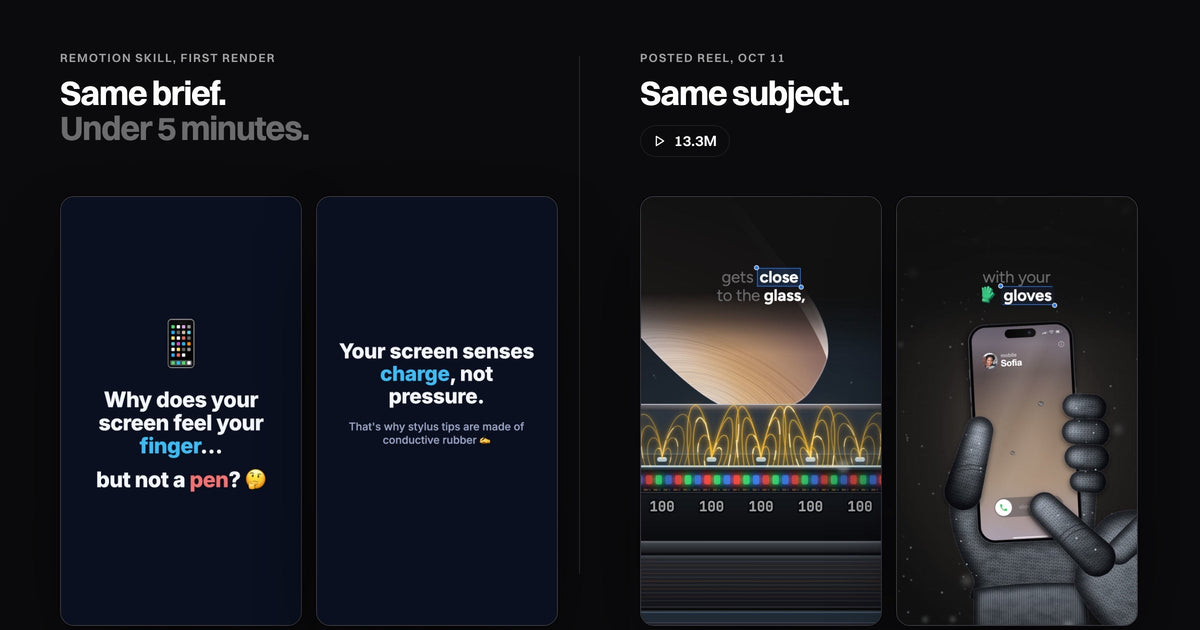
To use Remotion with Claude Code, create a Remotion project, add Remotion's official skills with one command (or install its Claude Code plugin), then ask Claude for a video. Remotion is free for individuals and companies of up to 3 people (read Nov 1, 2026). In my test, one sentence became a rendered 1080x1920 reel in 4 min 19 s. My touchscreen reel, 13.3M views (Instagram API, Oct 28), was also written as code by Claude Code and rendered with Remotion.
-
Two official routes, same 12 skills. The Claude Code plugin, or
npx remotion skills addinside a project. - Free for you, not for every company. Teams of 4 or more pay, from $25 per seat a month. Claude Code itself needs a paid plan.
- The first render is fast and clean, and generic. Shapes, emoji and slide titles, no voice.
- The setup doesn't make the reel. What people watch is the picture moving with the words.
 Remotion's skill, first renderOne sentence, under 5 minutes.
 Posted reel, 13.3M viewsSame subject, the field bends under the finger.
Left: what Remotion's own skill built from one sentence. Right: my posted reel on the same question, made with Full Visual, a folder for Claude Code and Codex.
How to install Remotion in Claude Code
Remotion gives Claude Code three ways in, all official and all free. Each one loads the same 12 Remotion skills (version 4.0.539 on Nov 1), so pick the one that fits how you work.
| Route | What you run | Where it lives |
|---|---|---|
| Claude desktop app | Code, Customize, Plugins, Discover, search remotion, Add |
Claude Code, every project |
| Plugin, in the terminal |
claude plugin marketplace add remotion-dev/claude-code-pluginclaude plugin install remotion@remotionthen restart Claude Code |
Claude Code, every project |
| Project skills |
npx create-video --yes --blank my-videocd my-videonpx remotion skills addthen start claude in that folder |
That one project folder |
With the plugin, start a session in an empty folder and type /remotion:remotion-create followed by what you want. With the project skills, just ask. You need Node.js; the current LTS versions, 22 and 24, both work. Still choosing a renderer? Read HyperFrames vs Remotion, or the other free Claude skills for video.
Go deeper: the sources and two other installers
Commands from Remotion's Claude Code plugin page, Prompting videos with coding agents and Agent Skills, read Nov 1, 2026. The skills page also installs with npx skills add remotion-dev/skills or gh skill install remotion-dev/skills. The skills repo had 6,018 GitHub stars and Remotion 69,683 on Nov 1.
Is Remotion free?
Yes, if you're an individual or a company of up to 3 people, with every feature and unlimited commercial use, per Remotion's license page (updated Nov 1, 2026). Bigger companies need a Company License.
Freelancers: if a client only receives the MP4, only your own headcount counts, says the license FAQ. The cost that is never free is the agent. Remotion's docs say "most coding agents require a paid subscription", and Claude Code needs a Claude plan or an API account.
Remotion Claude Code tutorial: my first video, timed
I set Remotion up the way its docs tell a new Claude Code user, then gave Claude only Remotion's skills and one sentence: "Make a 10-second vertical reel explaining why your phone screen reacts to a finger but not to a pen." No other files, no voice.
 1.8 s4.6 s
 7.4 s
 9 s
What the free setup does well. Right size and length on the first try, big readable type inside safe margins (the skill sets minimum sizes), correct physics at this level, and clean code you can change and render again in seconds. For a title card or a product promo, that's enough.
Go deeper: three things the docs don't tell you
The blank project starts at 1280x720, so say "vertical" or "1080x1920". The skill opens Remotion Studio, a live preview in your browser, and doesn't render until you ask, so ask for the MP4 (it runs npx remotion render). For a voice, its voiceover guide uses ElevenLabs and asks for your API key; any text-to-speech that makes an audio file works.
Why first renders look generic
Because the skill teaches Remotion, not what a viewer needs. Look at the test: a finger that is a beige capsule, a phone that is a rounded rectangle, emoji standing in for ideas, and four slides that each hold one picture while a title explains it.
Nothing is spoken, so nothing can land on a word. The red X tells you the pen fails. The posted reel shows it: the field under the glass stays flat while the voice says "ignores".
The pen, testA red X explains it. The pen, postedThe field stays flat on "ignores".
The longer version of this, with frames from four reels: how people make those Claude reels.
What separates a reel people watch
Same renderer, different decisions. These are the four a viewer feels, even without naming them.
Pacing. The picture never sits still while the voice talks, and never moves when the voice isn't talking about it.
One idea per beat. One thing to look at per sentence, not a title, an icon and a label at once.
Real interfaces, redrawn. A real call screen in a gloved hand, the real layers of a screen magnified, not a grey box.
The word on screen when it's said. The caption follows the voice and the spoken word is boxed as you hear it.
The touchscreen reel runs 84 s and was watched for 30.6 s on average (Instagram API, Oct 21).
Claude Remotion examples that went viral
Both were written as code by Claude Code and rendered with Remotion, with no video model involved.
The free skill gets you a working project in minutes. Full Visual is what I use for the rest: the research, the voice, the caption on every word and the scenes that move with it, finished and checked.

Full Visual
Explain any subject, word by word. A voice, a synced caption and real interfaces moving on every word.
Questions
What's the difference between the Remotion plugin and the Remotion skill?
Nothing in the skills: the plugin carries the same 12. The plugin installs once into Claude Code; npx remotion skills add puts them inside one project.
Does the Remotion plugin work in the Claude desktop app?
Yes. In the Code tab, open Customize, then Plugins, Discover, search "remotion" and click Add.
Can Remotion add a voiceover?
Yes, from an audio file. The skill's guide generates one with ElevenLabs using your own API key, and any text-to-speech tool works.
Does Remotion work with Codex too?
Yes. Remotion's docs list Claude Code, Codex, Kimi Code and OpenCode, with plugins for Codex, Cursor and GitHub Copilot.
Commands, skills and prices read on remotion.dev and GitHub on Nov 1, 2026. Test run on Nov 1 in an empty folder on a Mac, following Remotion's coding-agents page, timed with the system clock. Per-reel views: Instagram API for @speedy_devv, Oct 28; average watch time, Oct 21.