
HyperFrames vs Remotion: I built the same reel in both
One 8-second vertical scene, each tool set up by its own agent skill, timed. Which to pick, and where Claude Motion and Claude Design fit.

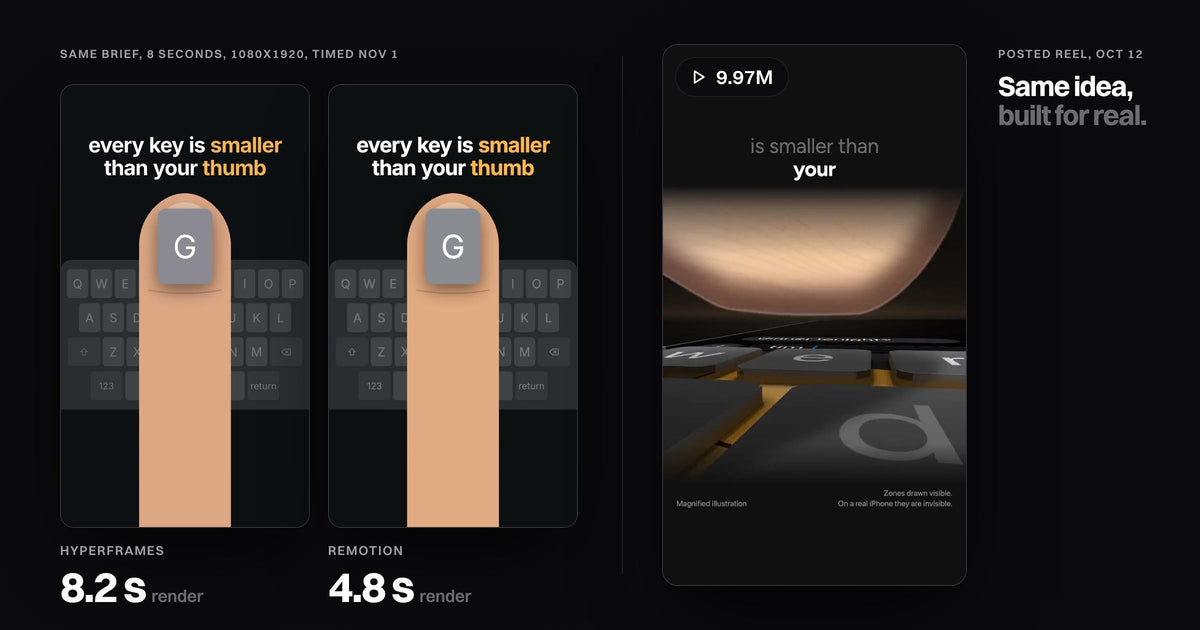
Use Remotion if you write React, want the most tutorials and templates, or work alone or in a team of up to 3 (it's free for you). Use HyperFrames if an AI agent writes your video code, you already have HTML or GSAP animations, or your company has 4+ people and won't pay a license. In my test on Nov 1, 2026, both turned one brief into the same 8-second 1080x1920 scene; Remotion rendered it in about 5 seconds, HyperFrames in about 8, on an M4 Mac mini.
- Same picture. With each tool's own agent skill, the two renders came out nearly frame for frame identical.
- Remotion renders faster, HyperFrames is lighter. 4.8 s against 8.2 s per render, but a 955 MB project against 2 MB.
- The license decides for teams. HyperFrames is Apache 2.0. Remotion is free up to 3 people, then $25 per seat a month.
- Anthropic's options are narrower. Claude Motion exports MP4 on Team and Enterprise plans only. Claude Design's help page lists no video export; it hands off to HyperFrames or Claude Code.
 HyperFrames8.2 s render, 374 KB file
 Remotion4.8 s render, 262 KB file
The same brief, the last frame of each render. Render times are the middle of three warm runs.
HyperFrames vs Remotion vs Claude Motion, side by side
HyperFrames and Remotion both open a real browser, draw each frame and encode an MP4. What differs is what you write, what it costs a team, and what the tool needs on your disk.
| HyperFrames | Remotion | Claude Motion | |
|---|---|---|---|
| What you write | HTML, CSS and JavaScript (GSAP) | React and TypeScript | Nothing: you ask in the Claude app |
| License and cost | Apache 2.0, free at any size. HeyGen credits only for HeyGen media or cloud renders | Free for individuals and companies of up to 3. Above that $25 per seat a month, or $0.01 a render ($100 minimum) for apps | Part of Team and Enterprise plans, counts toward usage |
| Agent support | 7 skills (4 core) and a Claude Code plugin. The skill runs a check and a snapshot before render | 12 official skills. Works with Claude Code, Codex, Kimi Code, OpenCode | Built into Claude |
| Render, 8 s at 1080x1920 | 8.2 s (7.8 to 8.3). Project 2 MB | 4.8 s (4.7 to 5.2). Project 955 MB | Not tested (Team plan only) |
| Templates and community | 448 registry blocks. 76.9K GitHub stars, repo since March 2026 | About 20 free starters. 69.7K stars, since 2020, far more tutorials | Anthropic's help center |
| Best for | Agent-written video, existing web work, teams of 4+ | React developers, data-driven or templated video | Short animations for work, no code |
Go deeper: the source for each row
HyperFrames: GitHub (license, stars, skills, Node 22 and FFmpeg required), its quickstart ("HyperFrames is free", HeyGen credits only when you ask) and the catalog count from npx hyperframes catalog. Remotion: License and pricing (Enterprise from $500 a month), Agent Skills, templates. Claude Motion: its help page. Stars from the GitHub API on Nov 1.
Same 8-second reel, built in both: setup and render timed
I gave both tools one brief: "A phone keyboard appears, one key grows to show it is smaller than a thumb, and the text 'every key is smaller than your thumb' types on, word by word." Vertical, 8 seconds, 30 fps, no sound.
Each one started from an empty folder, set up exactly as its quickstart says, and built only with what its own agent skill teaches. Remotion's setup steps are in my guide to Remotion with Claude Code. The brief is the opening idea of my phone keyboard reel, so I knew what good looks like.
 HyperFrames at 1 sThe key lifts out of the row.
 Remotion at 1 sSame move, a slightly different ease.
Both files are H.264, 1080x1920, 240 frames. Setup times are close enough that your network decides them.
Go deeper: how the test ran
Mac mini, Apple M4, 16 GB, Node 24, FFmpeg 9. HyperFrames 0.8.226: npx skills add heygen-com/hyperframes (core skills), npx hyperframes init, check, snapshot, render --quality delivery. Remotion 4.0.539: blank project, its agent skills, rendered with npx remotion render. Times are wall clock, including each command's startup. I wrote the code the way each skill asks: 192 lines of HTML for HyperFrames, 216 lines of TSX for Remotion. Both skills say to open their preview before rendering; I skipped that because the test ran headless. HeyGen's own comparison, a 15-second landscape video, timed the whole agent run instead: 11 min 50 s for HyperFrames, 12 min 30 s for Remotion.
Where each one fought me
HyperFrames fought on defaults. A new project is 1920x1080, so going vertical meant changing the size in four places. Its check flagged the key popping over the keyboard as three layout errors, which is the whole point of the scene, until I marked the overlap as meant. And hyperframes init quietly installed its skills into my global Claude Code folder, not just the project.
Remotion fought on weight. The blank project was 314 MB of packages, and its first frame downloaded a 574 MB browser into the project, so it ended at 955 MB. The skill also wants every element wrapped for its Studio editor and a separate package for the font. In return, the TypeScript compiled and both renders were right the first time.
Neither one drew a better keyboard. The picture came from the brief and the code, not the renderer.
HyperFrames in Claude Code vs Remotion in Claude Code
Both work well in Claude Code; they push the agent in different directions. The HyperFrames skill is a contract plus a loop: write the HTML, run check, look at a snapshot, then render. Its snapshot is how I saw my first thumb was too narrow, before a single frame was encoded.
The Remotion skill routes the agent to the right guide (captions, maps, transitions, fonts) and keeps the code editable in Remotion Studio. It is the better fit if you or a developer will keep editing the React by hand.
HyperFrames also has a connector that renders from a Claude.ai chat in your HeyGen account, with no folder at all. Every skill worth installing for video is in Claude skills for video.
Claude Motion vs Remotion, and where Claude Design fits
Claude Motion is Anthropic's own animation tool: you ask in the Claude app and export an MP4. On Nov 1, 2026 it is in beta on Team and Enterprise plans only, and its help page names no vertical format, voice or captions. Like Remotion, it builds the animation as code; unlike Remotion, the only export its page names is the MP4, not a project you render yourself.
Claude Design is not a video tool. Its help page lists PDF, PowerPoint, Google Slides, HTML and zip exports, plus "Send to Hyperframes" and a handoff to Claude Code. So "HyperFrames vs Claude Design" is the wrong fight: Claude Design sets the look, then HyperFrames or Remotion renders the video.
What I render my own reels with
My reels are rendered with Remotion. That's context, not the verdict: the test above says viewers wouldn't see the difference. The touchscreen reel has 13.3M views and the phone keyboard reel 9.97M (Instagram API, Oct 28, 2026).
The test, 1 briefA correct scene, and a flat one. The posted reel, 9.97MSame idea, built shot by shot.
The gap between those two frames is not HyperFrames or Remotion. It is the subject, the opening line and a real-looking keyboard moving on each word. My reels are made with Full Visual, a folder for Claude Code and Codex. How the whole thing works, layer by layer: how people make those Claude reels.

Full Visual
Explain any subject, word by word. A voice, a synced caption and real interfaces moving on every word.
What other HyperFrames vs Remotion reviews miss
The top pages compare spec sheets. HeyGen's own guide is fair and even lists what Remotion does better, but it tests a landscape launch video once. Masset and Wireflow compare licenses and features without a test. People keep asking the same question on Reddit, in r/ClaudeAI and r/MotionDesign.
None of them renders a vertical 1080x1920 reel, times both renderers on one brief, measures the disk, or checks Claude Design's own help page. Some YouTube videos show an MP4 export in Claude Design; Anthropic's help page lists none, so treat it as unconfirmed.
Questions
Is HyperFrames better than Remotion?
Not for output: from the same brief the frames matched. HyperFrames is better if an agent writes the code or your team is 4+; Remotion is better if you write React or want the most examples.
Is HyperFrames free?
Yes, it is Apache 2.0 at any company size. You pay HeyGen only for its media, avatars or cloud renders, and your agent bills its own plan.
Can Claude Design export video?
Not by itself, per its help page on Nov 1, 2026. It exports PDF, PowerPoint, HTML and zip, and sends a project to HyperFrames or Claude Code, which render the MP4.
Does Claude Motion replace Remotion?
For short work animations on a Team or Enterprise plan, it can. Its help page names MP4 as the export, with no code project, batch rendering or vertical format mentioned.
Can I move a Remotion project to HyperFrames?
Yes. HyperFrames ships a remotion-to-hyperframes skill that ports compositions and flags what it can't translate, such as React state.
Test run on Nov 1, 2026 in an empty folder, each tool set up from its own quickstart and agent skill, three warm renders each. Licenses, skills and plans read on hyperframes.heygen.com, GitHub, remotion.dev and support.claude.com the same day. Reel views: Instagram API for @speedy_devv, Oct 28.