
How to make a product demo video with AI that shows the real UI
Give Claude Code or Codex your URL, repo or screen recording and it builds the film as code from your real interface. Tools compared, costs, examples.

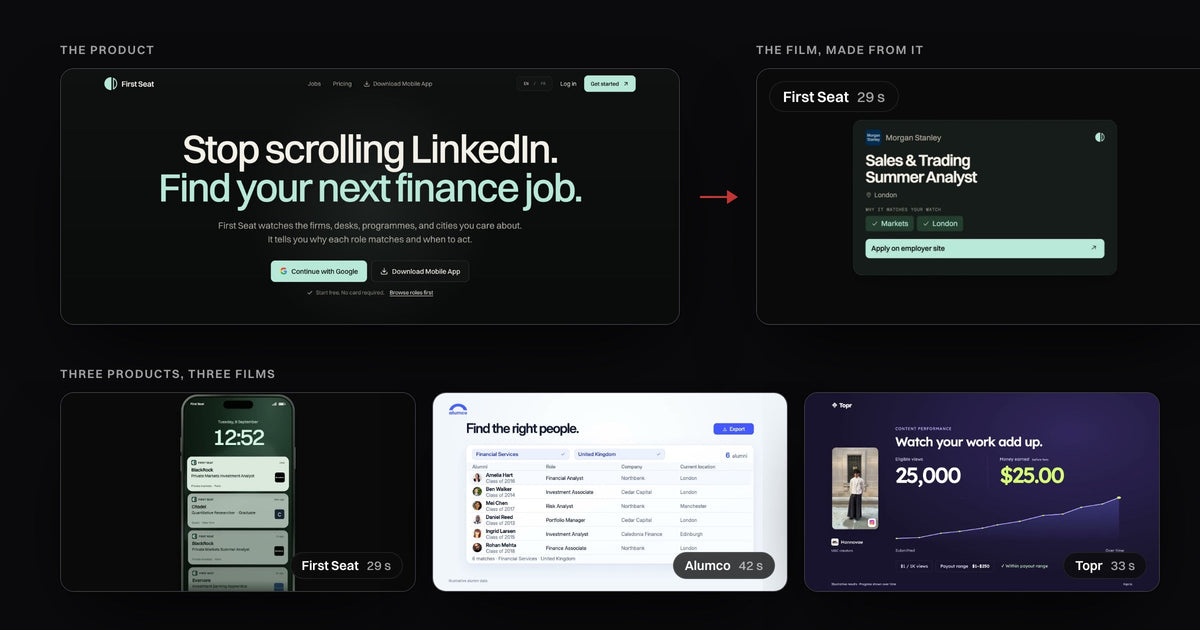
Give a coding agent such as Claude Code or Codex your product's URL, repo or a screen recording, and ask it for a launch video. It builds the film as code from your real interface, so the buttons, text and flow stay yours instead of an AI-generated version, and renders an MP4 you can still edit. Our Product Demo pack ($39, Nov 8, 2026) is that setup, already written; the First Seat film below is one of three examples on its page.
- Real UI or not is the test. Recorders and demo builders capture it, avatar tools talk over it, coding agents redraw it as a film.
- The agent route keeps your product. It reads the site, repo or recording and shows each screen large enough to read on a phone.
- Remotion alone works, slowly. You write the direction yourself. Product Demo is that direction, already written.
- The honest cost. $39 once, plus Claude Pro or ChatGPT Plus, any voice service, and a $25 Remotion seat a month at 4+ people.
Make a SaaS demo video from your website URL with Claude Code
Open Claude Code or Codex in the Product Demo folder, give it your URL, repo or recording, and ask for the film: the agent studies the product, finds the story, builds each scene and renders the MP4. The steps, from the store page (read Nov 8):
- Bring the product. A URL, a repo, an app, a design or a recording. Behind a login, you sign in or bring a recording.
- Ask for the film. Say who will watch it and where it plays, so the agent picks the size and length.
- Review it, then ask for the next version. The MP4, the editable source and the product material stay in one folder.
Here is that on First Seat, a job-alert app for finance roles. The film keeps the site's dark ground, mint green and type, and pulls single pieces of the app out, large: a watch switch, alerts on a lock screen, one role card.

 6 s
 15 s
 21 s
What AI tool can I use to make SaaS product demo videos?
Pick by one test: does the video have to show your real product UI? The r/SaaS thread with that exact title (Sep 2026) set the bar: "it has to show the real product UI not an AI-generated version of the interface that changes buttons, text, or the flow."
| Kind | What you get | Your real UI? | Price | The catch |
|---|---|---|---|---|
| Screen recorder, such as Screen Studio | Your own take, with zooms and framing | Yes, as recorded | $29 a month, or $9 a month yearly | Mac only. A UI change means a new take |
| Interactive demo builder, such as Arcade or Storylane | A clickable tour, also exported as video | Yes, captured | Arcade Pro $49 a month yearly; Storylane Starter $50 a month | Built to be clicked through. AI edits use credits |
| AI avatar video, such as Synthesia | A presenter reading your script over your recording | Only what you record | $19 a month, or $14 a month yearly | Credits per minute. The presenter is an avatar |
| Claude Motion | Short animations from your content, exported as MP4 | Only images you attach | Team and Enterprise plans, in beta | Its help page names no voice, sound or vertical format |
| Coding agent with Product Demo | A film built as code from your URL, repo or recording, plus its source | Yes, redrawn and animated | $39 once, plus Claude Pro or ChatGPT Plus | Voice billed by your provider. Remotion seats at 4+ people |
Footage generators such as Luma start from a written product description (Luma's launch page, Nov 8), so they suit mood shots, not your screens.
Anyone actually using Remotion for SaaS feature videos?
Yes, and it works, but the direction is yours to write. That r/SaaS title (Mar 2026) ends "I burned a whole day and I'm not sure it's worth it". Remotion and HyperFrames both turn code into an MP4 with Claude Code or Codex. The renderer is free; the direction is not.
The free route leaves you the story, the screens to pull out, the motion, the sound and the checks. "I tried Remotion with claude code and not gonna lie it was pretty bad" (r/SaaS, Mar 2026). An engineer who shipped a good one spent "about two days over a weekend" and found that "Pacing is the hard part and you cannot get it by just asking a chatbot for it" (r/SideProject, 2026).
Everyone who gets good results writes the same folder of instructions by hand. Product Demo is that folder, already written: it guides product research, storytelling, visual design, animation, sound and final checks, and your agent does the work. My explainer reels come from the same idea, and the touchscreen one reached 13.5M views (Instagram API, Nov 8): how people make those Claude reels.

Product Demo
Turn your product into a demo film from a URL, a repo or a recording.
Product demo video examples that show the real UI
The three films on the Product Demo page look nothing alike, because each one takes its product's own colors, type and screens.
 Alumco, 20 s
 Alumco, 33 s
 Topr, 9 s
 Topr, 23 s
Look at the small type in the corners: where names and numbers are made up, the film says so ("Illustrative alumni data"). A demo that labels its sample data is one a buyer can trust.
An affordable alternative to an agency for a 60-second launch video
$39 once, plus the agent plan you may already pay for. Studios that publish a price start at a median $4,000 for a 60-second SaaS video, with a first cut in 2 to 6 weeks (Opzami's count of 11 studios, Oct 2026).
On top: any voice usage and, because the films render with Remotion, a Company License at 4 or more people, $25 per seat a month "including using AI agents" (Remotion, Nov 8). Before a Product Hunt launch, plan for a few rounds of notes, not one prompt, and have ready:
- One claim. The single thing the film has to prove.
- Access. The live URL, the repo, or a recording of the flow behind your login.
- Where it plays. 16:9 for the landing page, 9:16 for launch posts.
- A voice, if you want one. Your own recording, or an ElevenLabs, OpenAI or Fish Audio voice, billed by them.
An editable product demo video you can download and customize
Product Demo is a download, and every film keeps its editable source, so a changed screen or a shorter cut for sales is a new request in the same folder, not a new video. That is what product marketers say hurts most: "One UI change and suddenly you discover just how many videos contain that screen" (r/SaaSMarketing, Oct 14, 2026).
What you get
- A film of your product from a URL, repo, app, design or recording
- The MP4, the editable source and the product assets in one folder
- Size and length picked for where it will play
- Every next version from the same folder
- One price, and videos you can deliver to clients
What you don't
- A clickable demo: that is Arcade or Storylane
- An App Store app preview: Apple's guideline 2.3.4 allows only screen captures there
- Review links, approvals or team seats: it is a folder on your computer
- A finished film from one prompt: expect rounds of notes
- Agent plan, voice or Remotion seats: separate
Questions
Do I need a Remotion license to make videos for my company or my clients?
Remotion is free for individuals and companies of up to 3 people. A Company License is "required for collaborations and companies of 4+ people", from $25 per seat a month (remotion.pro, Nov 8). The videos you make with Product Demo are yours to deliver to clients.
Can I turn my screen recording into a polished launch video without learning After Effects?
Yes. A recording is one of the inputs, and the agent builds the film from it as code, with no editing app. It is also the way in when the agent can't reach a product behind a login.
Doesn't an AI product demo video look AI generated?
Not this kind. No video model draws your screens: they are rebuilt from your own product, and the examples above label their sample data. For the voice, use your own recording or none.
Is there a free AI product demo video generator?
Not one that shows your real UI as a finished film. The renderers underneath are free (Remotion up to 3 people), but the story, the screens and the motion are the work. Product Demo is $39 once (Nov 8), plus Claude Pro or ChatGPT Plus.
Do I need to know how to code?
No. Claude Code "reads your codebase, edits files, runs commands" (its docs), so the agent sets up the folder and writes the code. You need the Claude app on Pro or higher, or ChatGPT Plus with Codex, on a Mac or Windows computer with 10 GB free.
Everything read Nov 8, 2026: Product Demo's store page and the Keyframes help center; the film files on that page (lengths measured); Screen Studio's, Arcade's, Storylane's and Synthesia's pricing; Remotion's licence, Claude Motion's help page, HyperFrames' guide, Claude Code's docs, Apple's guidelines; the Reddit threads (the r/SaaSMarketing quote via our buyer research). Views: Instagram API for @speedy_devv.